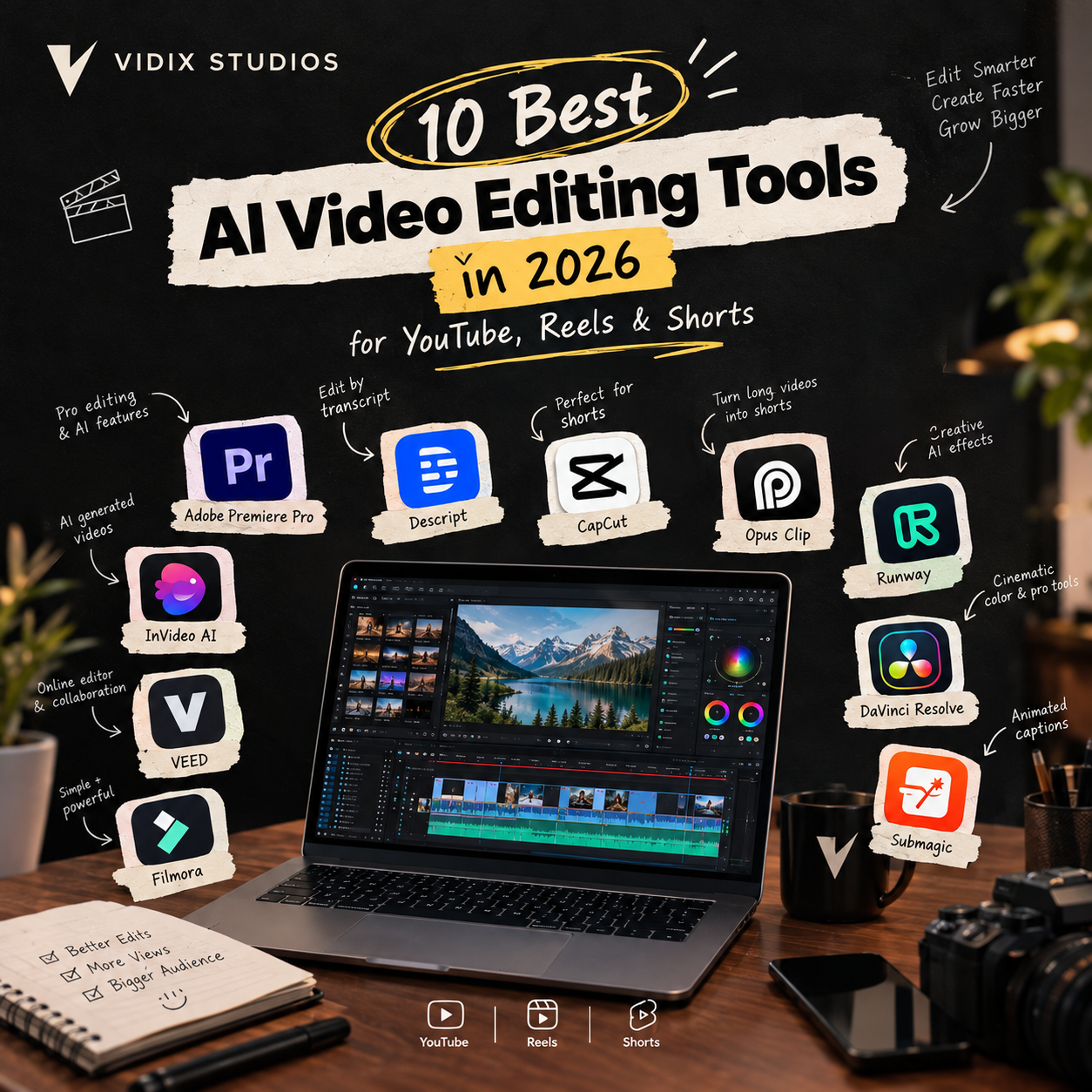
Short-form and long-form video now run the internet, and creators are expected to publish constantly. That is exactly why the best AI video editing tools have become essential. They cut hours of work into minutes by handling captions, cuts, reframing and even generative effects.
Not every tool suits every job, though. A tool that is perfect for Reels can be clumsy for a 20-minute YouTube video. At vidix studios, we edit for creators and brands every day, so here is our practical breakdown of the tools worth your time in 2026.
How We Picked the Best AI Video Editing Tools
We looked at four things: editing speed, output quality, ease of use, and how well each tool fits YouTube, Reels or Shorts workflows. Pricing changes often, so check each tool’s site for current plans.
1. Adobe Premiere Pro
Premiere Pro remains the industry standard, and its AI features keep improving, including text-based editing, auto-reframe and generative tools. It has a learning curve, but nothing matches its control for serious YouTube work.
Best for: Professional long-form YouTube editing.
2. Descript
Descript lets you edit video by editing a transcript. Delete a sentence in the text and it disappears from the video. It also removes filler words and improves audio quickly.
Best for: Podcasts, interviews and talking-head videos.
3. CapCut
CapCut is a favorite for short-form creators thanks to auto-captions, templates, effects and one-tap background removal. It is fast, beginner-friendly and built around vertical video.
Best for: Reels, TikToks and Shorts.
4. Opus Clip
Opus Clip turns long videos into short clips automatically. It finds the strongest moments, reframes them vertically and adds captions, which makes repurposing a podcast or livestream much easier.
Best for: Repurposing long content into Shorts.
5. Runway
Runway is a creative AI suite known for generative video, object removal and background replacement. It is great for experimental visuals and effects that once needed a full VFX team.
Best for: Creative effects and generative B-roll.
6. DaVinci Resolve
Resolve offers professional color grading and editing, plus AI tools such as magic mask and speech-to-text. Its free version is powerful, so it is a strong pick for creators who want depth without a subscription.
Best for: Cinematic color and advanced editing.
7. Submagic
Submagic specializes in animated, eye-catching captions, which matter a lot because most short-form viewers watch on mute. It also adds emojis and highlights keywords automatically.
Best for: Captioned Reels and Shorts.
8. InVideo AI
InVideo AI can generate a draft video from a text prompt, including script, stock footage and voiceover. You can then refine it by giving the AI plain-language instructions.
Best for: Faceless YouTube channels and quick explainers.
9. VEED
VEED is a browser-based editor with auto-subtitles, noise removal and screen recording. There is nothing to install, so it works well for quick edits and team collaboration.
Best for: Fast online edits and social content.
10. Filmora
Filmora balances simplicity and features, with AI tools for smart cutouts, audio cleanup and auto-highlight clips. It is a good step up from phone apps without being overwhelming.
Best for: Beginners moving to desktop editing.
Quick FAQs About the Best AI Video Editing Tools
What is the best AI video editing tool for YouTube?
Premiere Pro and DaVinci Resolve are the strongest for long-form YouTube. Descript is a great addition for dialogue-heavy videos.
Which AI editor is best for Reels and Shorts?
CapCut and Opus Clip are the top picks, with Submagic ideal for captions.
Are free AI video editors good enough?
Yes, for many creators. DaVinci Resolve and CapCut have capable free tiers. Paid plans mostly add exports, storage and advanced AI features.
Can AI replace a professional video editor?
Not fully. AI handles repetitive tasks well, but storytelling, pacing and brand consistency still need a human eye.
Is AI-edited content safe for monetization?
Generally yes, as long as the content is original and adds value. Always follow each platform’s current policies on AI-generated media.
When AI Tools Aren’t Enough
AI tools are fast, but they have limits. They can miss emotional beats, produce generic pacing and struggle with brand-specific style. If your channel or business depends on video, polished editing directly affects watch time and conversions.
That is when hiring a professional video editing agency in USA makes sense. A good agency uses the same AI tools you do, but adds creative direction, quality control and a reliable turnaround. Not sure what to look for? Read our guide on how to choose the best video editing agency.
See Our Work: The Vidix Portfolio
Words only go so far, so see the results yourself. The vidix studio portfolio includes YouTube videos, Reels and Shorts edited for creators and brands, with sharp pacing, strong hooks and clean captions that keep viewers watching.
👉 Explore the Vidix portfolio and see what pro editing looks like. Ready to level up your content? Get in touch with our team for a quote.
Final Thoughts
The best AI video editing tools in 2026 save time and lower the barrier to making great videos. Use CapCut or Opus Clip for fast short-form, Premiere Pro or DaVinci Resolve for polished long-form, and tools like Descript or Runway to speed up specific tasks. When quality matters most, pair the tech with professional editors.